Tool calling is often presented as the capability that unlocks enterprise AI.
In practice, calling a tool is usually the easy part.
The harder problem is deciding whether that capability should be exercised at all.
Should the agent act on behalf of a user?
Should it establish its own workload identity?
Which organizational resources should it be allowed to access?
Who is accountable for the action?
Those questions quickly become more complicated than invoking an LLM or wiring together APIs.
As organizations adopt agentic systems, a familiar problem begins to emerge.
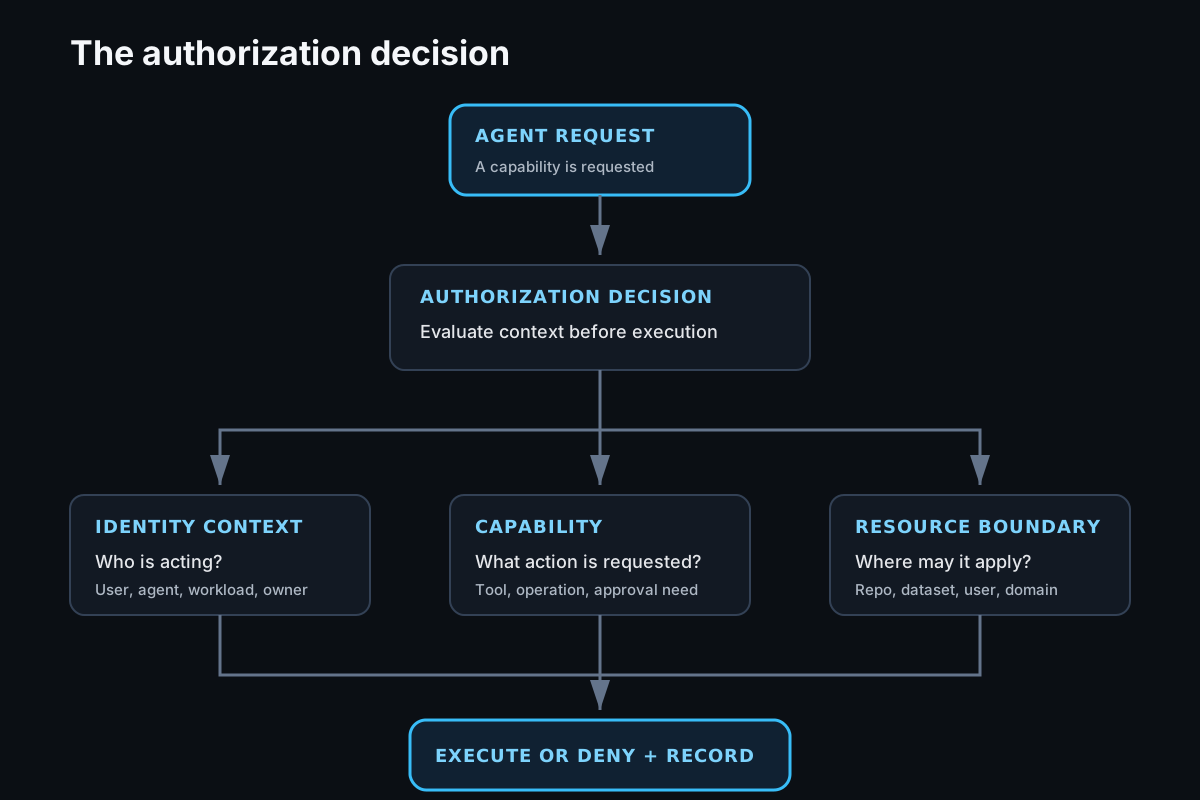
Every interaction between an agent and an organizational resource is an authorization decision.
That changes the architecture.
Instead of starting with tools and integrations, start with authorization.
Tool calling is a capability. Authorization determines whether that capability can be exercised.
Everything else builds on that.
An authorization gateway, not a tool gateway
People often describe these systems as tool gateways or MCP gateways.
Those descriptions are useful, but they do not capture the gateway's real responsibility.
Agents do not need access to tools.
They need controlled access to organizational resources.
Those resources might include:
- GitHub repositories
- Google Workspace
- BigQuery
- Internal APIs
- Browser automation
- Bash and Python execution
- MCP servers
- External SaaS platforms
Every interaction with one of those resources asks the same question.
Can this agent perform this action against this resource?
An authorization gateway is not there to make APIs easier to call.
It is there to make authorization easier to govern.
Tool Manifests are authorization contracts
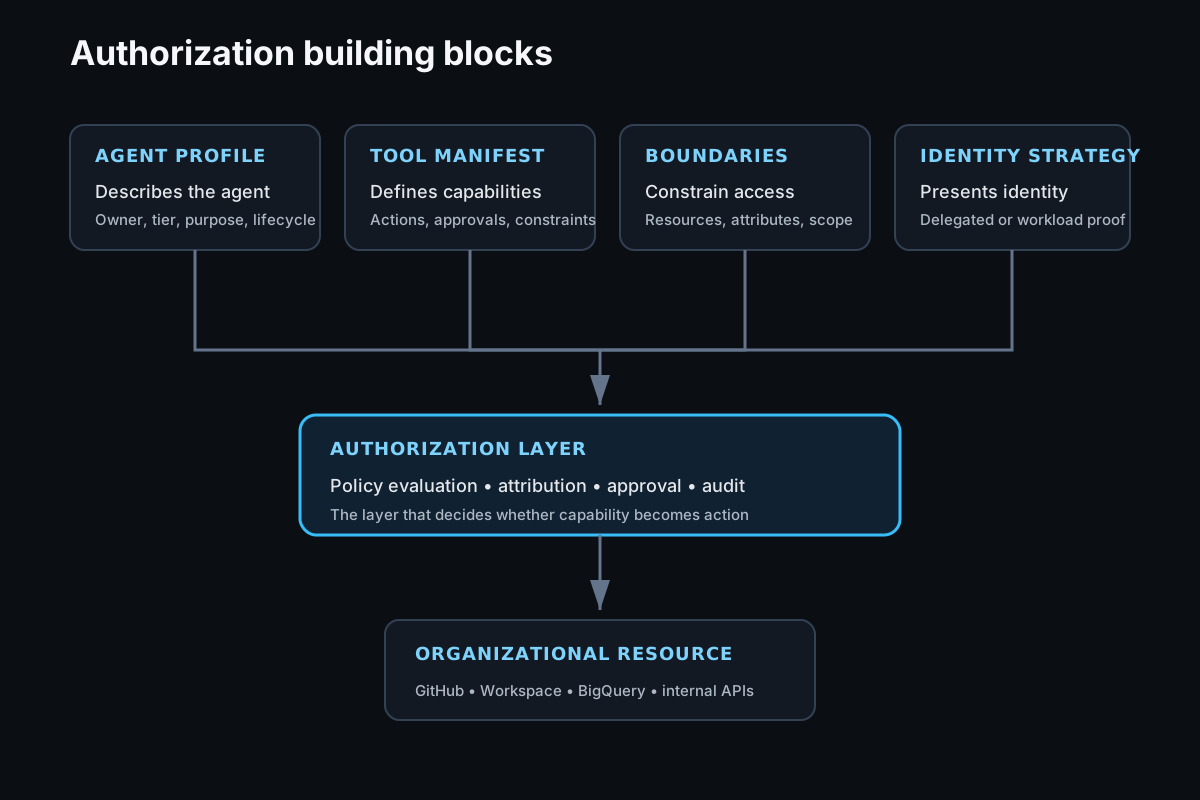
Tool Manifests are more than inventories of available tools.
They are authorization contracts between an agent and the organization.
They define the capabilities an agent is trusted to exercise and the boundaries within which those capabilities operate.
A Tool Manifest can define:
- Available capabilities
- Resource boundaries
- Allowed operations
- Identity Strategy
- Runtime constraints
- Approval requirements
- Audit requirements
A GitHub Tool Manifest might allow pull request creation against specific repositories while explicitly preventing merges.
A Google Workspace Tool Manifest might allow draft creation in Gmail, read access to approved Drive folders, and access to approved users' primary calendars without allowing email delivery.
A BigQuery Tool Manifest might allow read-only queries against approved datasets while limiting access to resources tagged with approved labels, business classifications, or ownership metadata.
Thinking about Tool Manifests this way shifts the conversation away from "what tools are available?" toward "what business capabilities has this agent been authorized to perform?"
Agent Profiles provide context
Once Tool Manifests become authorization contracts, another question naturally follows.
How does the gateway know which manifests apply to a particular agent?
That is where Agent Profiles come in.
An Agent Profile is not responsible for authorization.
It provides the context needed to make authorization decisions.
If you have worked with an identity provider like Okta, Microsoft Entra ID, or Google Workspace, the concept should feel familiar.
User profiles do not define authorization.
They describe the identity.
The same idea applies to agents.
An Agent Profile might look like this:
agent:
  id: release-analysis-agent

  owner:
    team: security-engineering

  business_process:
    release-management

  environment:
    production

  risk_tier:
    medium

  lifecycle:
    active

  assigned_manifests:
    - github-release
    - deployment-metrics
The profile is intentionally a blank slate.
Every organization will describe its agents differently.
Some may include business units, cost centres, application ownership, geographic regions, or data classifications.
Others may add metadata that reflects governance, business processes, compliance requirements, or internal policy.
The schema is not important.
What matters is that the Agent Profile becomes the authoritative description of the agent, just as an identity provider becomes the authoritative description of a human identity.
Those attributes provide the business context the authorization layer uses when evaluating policy.
Identity Strategy
Identity is another area where it is easy to become overly focused on implementation details.
We initially thought about credentials.
Then we thought about multiple identities.
The better abstraction is Identity Strategy.
An agent has a stable enterprise identity.
What changes is how that identity is presented to downstream resources.
| Resource | Example Identity Strategies |
|---|---|
| GitHub | GitHub App, Fine-Grained PAT, OAuth App |
| Google Workspace | Delegated OAuth, Service Account |
| BigQuery | Service Account Impersonation |
| Internal Services | SPIFFE Workload Identity |
| Legacy SaaS | Managed API Credential |
The credential itself is simply the proof required to execute the chosen strategy.
Thinking this way separates authentication from authorization and makes it easier to evolve integrations without changing policy.
Resource boundaries matter more than permissions
Permissions answer what an identity can do.
Resource boundaries answer where, to whom, and under what conditions those permissions apply.
For GitHub, a boundary might define:
- Approved repositories
- Protected branches
- Pull request creation only
- Issue creation only for designated repositories
For Google Workspace:
- Approved Drive folders
- Primary calendars for approved users
- Gmail draft creation for approved users, shared mailboxes, or distribution lists
For BigQuery:
- Approved projects
- Approved datasets
- Approved tables
- Read-only queries
- Resources matching approved labels or tags
- Resources with approved business classifications
Every boundary describes four dimensions.
- Which resources
- Which subjects
- Which operations
- Which attributes
Those attributes do not have to identify individual resources.
They can describe ownership, environment, business domain, data classification, labels, tags, or any other metadata meaningful to your organization.
As environments grow, attributes become far more scalable than maintaining long lists of individual resources.
Capability-oriented tooling
Tool design can simplify authorization just as much as policy.
Instead of exposing broad operations such as:
gmail.execute()

github.execute()
expose capabilities that already communicate their intended security boundary.
gmail.create_draft_as_user()

gmail.create_draft_shared_mailbox()

calendar.read_primary_calendar()

github.create_issue_security_repository()

github.create_pull_request_release_repository()
These are not simply aliases.
Each capability communicates its intended purpose, expected Identity Strategy, and resource boundary before authorization is even evaluated.
Humans can understand what an agent is capable of simply by reading the available capabilities.
The authorization layer has less ambiguity when evaluating requests.
Capability-oriented tooling also discourages exposing broad APIs that require increasingly complex runtime authorization logic.
The Tool Manifest still defines the authorization contract.
The authorization layer still evaluates every request.
The capability simply provides a better vocabulary for expressing what an agent is allowed to do.
Audit belongs in the authorization layer
Many enterprise integrations execute using shared identities.
A GitHub App.
A service account.
A workload identity.
A shared mailbox.
To the downstream platform, every request may appear to come from exactly the same identity.
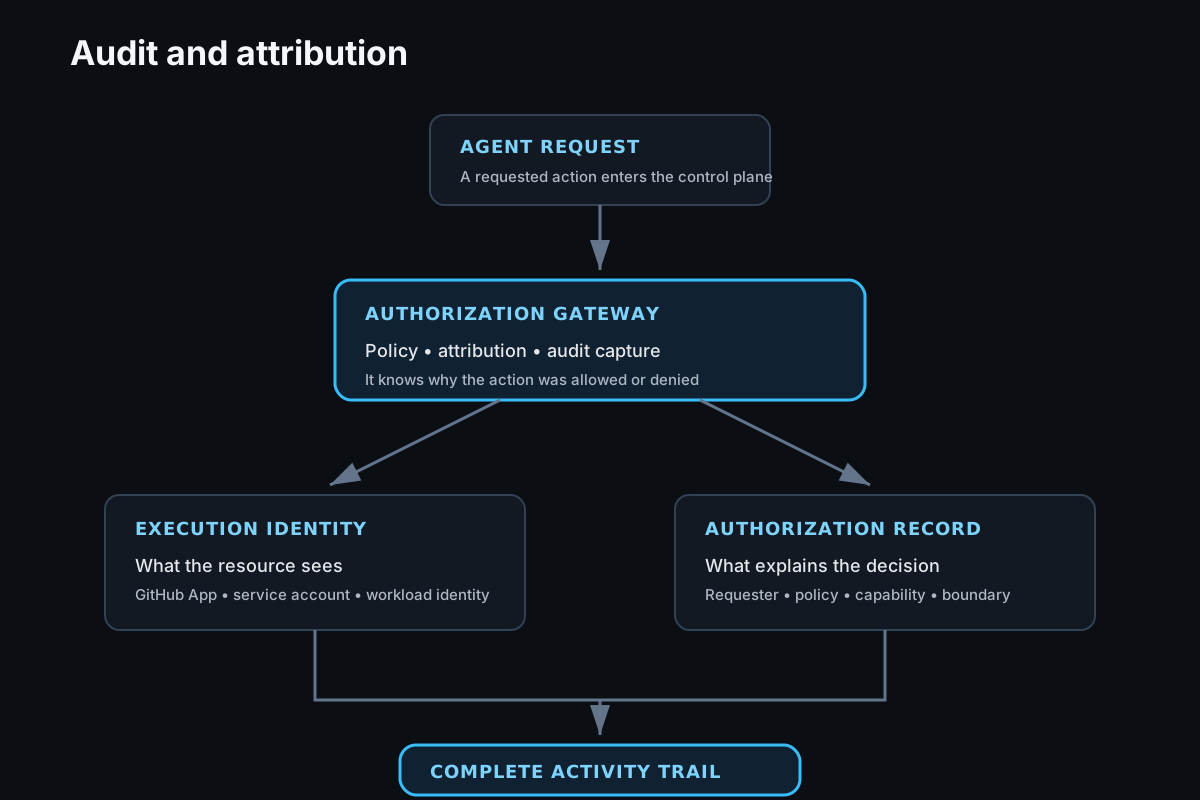
The downstream platform records what executed.
It often cannot explain why it was allowed to execute.
The authorization layer already has that context.
It knows:
- Which agent initiated the request
- Whether it originated from a user or an automated process
- Which Tool Manifest authorized the action
- Which resource boundary was evaluated
- Which Identity Strategy was selected
- Which execution identity was ultimately used
The downstream platform sees the execution identity.
The authorization layer sees the business context behind the request.
Recording that information creates an authorization trail that complements downstream audit logs.
Together they provide a complete picture of an agent's activity.
Putting it together
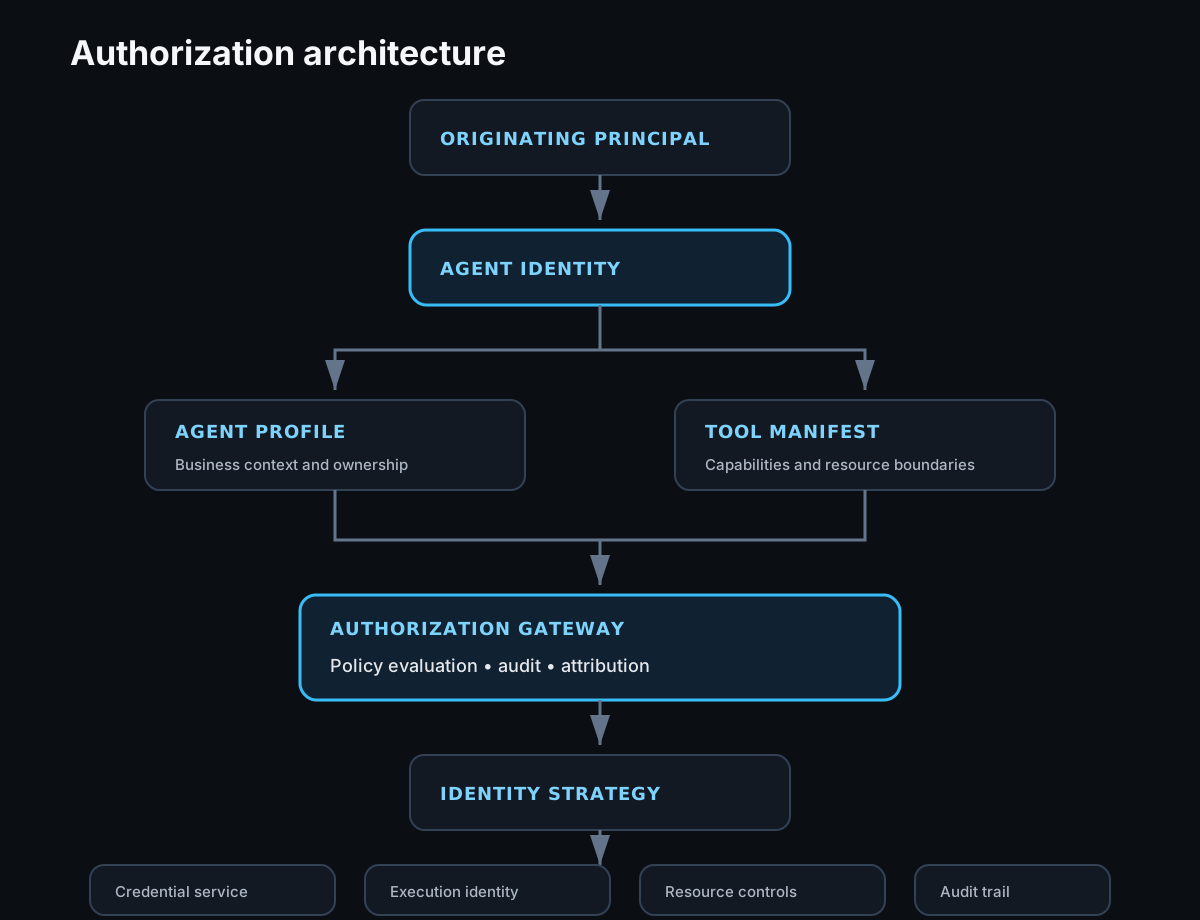
Each layer has a single responsibility.
The Agent Profile describes the agent.
The Tool Manifest defines what that agent is allowed to do.
The Authorization Gateway evaluates policy, records attribution, and captures the authorization trail.
The Identity Strategy determines how requests authenticate.
The Credential Service provides the proof required to execute them.
Each organizational resource continues enforcing its own controls, while the authorization layer provides consistent policy evaluation before execution.
Closing thoughts
Tool calling is an important capability.
It is just one small part of building trustworthy enterprise agents.
The harder challenge is deciding what those agents are allowed to do, how those decisions are governed, and how they can be explained after the fact.
This is not intended to prescribe a single architecture.
Every organization will make different implementation choices.
The important shift is recognizing that authorization deserves to be treated as its own architectural layer.
Once every interaction between an agent and an organizational resource is viewed as an authorization decision, many of the design choices around identity, capabilities, credentials, audit, and policy begin to fall naturally into place.